Reference Data: DoorDash Baseline Account Fields [Guide]
Last updated: September 29, 2026
 |  |  |  |
| Onboarding and Configuration | Baseline Account | (Billing) Account | Order-Level Fields |
 |
This reference lists the carrier-specific DoorDash Baseline Account fields used in techSHIP configuration.
Use it together with the linked Baseline Account setup steps: the setup guide covers the shared configuration flow, while this article defines the confirmed field values, field behavior, and carrier-specific configuration details.
 |
For a complete overview of supported carriers and related setup guides, refer to techSHIP supported Carriers - Master List [Guides List].
|
 | Review DoorDash Onboarding Requirements and Configuration Guides [Information] before configuring the Baseline Account so required credentials and account settings are confirmed. |
TABLE OF CONTENTS
Adding a Baseline Account
Follow the UI Navigation steps in How to Add a Carrier Baseline Account [Step-by-Step guide], using the carrier-specific values provided in this guide.
Go to  | |
 |  |
| Essential Configuration | Carrier-Specific This article |
Carrier-Specific Instructions
| Return to | |
 |  |
| Essential Configuration | Carrier-Specific |
Carrier Tab
The Carrier tab contains the Baseline Account fields used to identify the carrier connection and define confirmed carrier-specific behavior. Highlighted fields indicate mandatory and optional configuration groups.
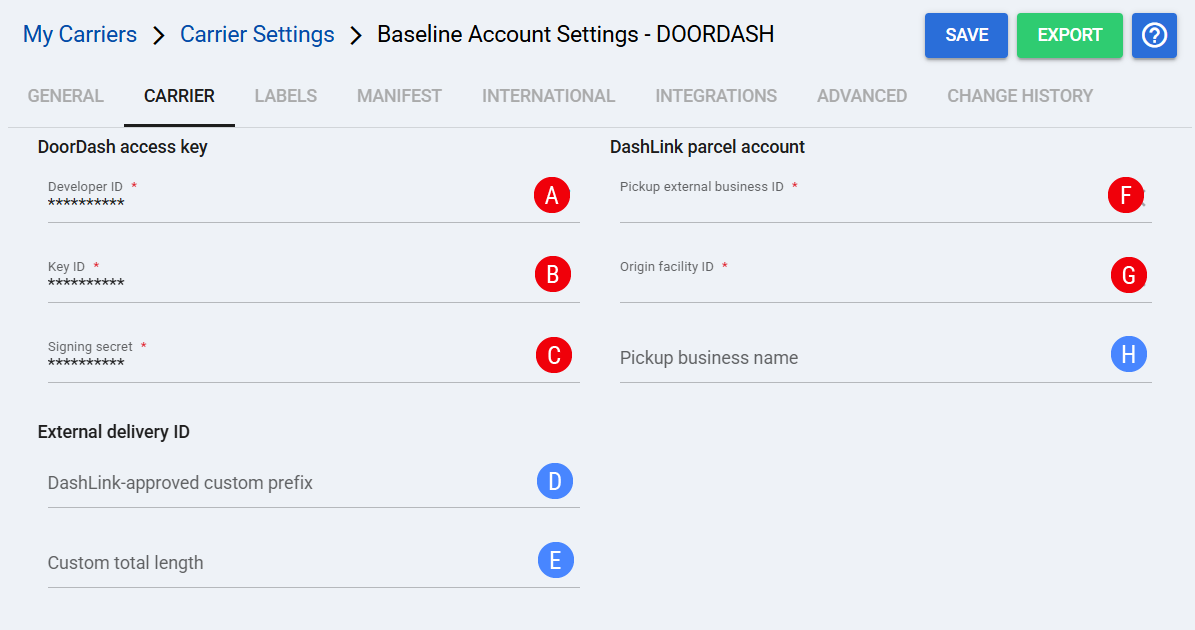
 | Developer ID: Identifies the DoorDash developer credential used with Key ID and Signing secret to authenticate the Baseline Account. |
 | Key ID: Identifies the DoorDash signing key used with Developer ID and Signing secret. |
 | Signing secret: Provides the secret used with Developer ID and Key ID to authenticate the DoorDash connection. |
 | DashLink-approved custom prefix: Defines the DoorDash-approved prefix used when custom external delivery IDs are configured. |
| |
Use only a prefix approved by DoorDash. Configure this field together with Custom total length.
|
 | Custom total length: Defines the total length of the custom external delivery ID used with the approved custom prefix. |
| |
Custom external delivery IDs must be unique, 15–35 characters, and cannot start with zero. Configure this field together with DashLink-approved custom prefix.
|
 | Pickup external business ID: Identifies the DashLink Parcel business/account used by DoorDash for this Baseline connection. |
 | Origin facility ID: Identifies the DoorDash origin facility used for pickup processing. The configured facility determines the pickup location used by DoorDash. |
 | Pickup business name: Provides the pickup business name for the Baseline Account when a value is configured. |
Labels Tab
Set Mode to the confirmed label format supported for this carrier.
| Select Save before continuing so the configured settings are applied. |
Finalizing the Setup
Once the Baseline Account has been created, validated, and saved, continue with Reference Data: DoorDash Client (Billing) Account Fields [Guide].
| Go to | |||
 |  |  | |
| Onboarding and Configuration | Baseline Account | (Billing) Account | Order-Level Fields |