Tracking link not updating to Sales Channel [Solution]
Last updated: September 29, 2026
When updating Sales Channels with Sales Orders, you might be able to update successfully, but could be missing the Tracking link, which might be needed to send it to the end customer.
This issue is related to unconfigured mappings of the tracking URLs.
To solve this issue, you will have to configure such mapping.


To do so, you will have to:
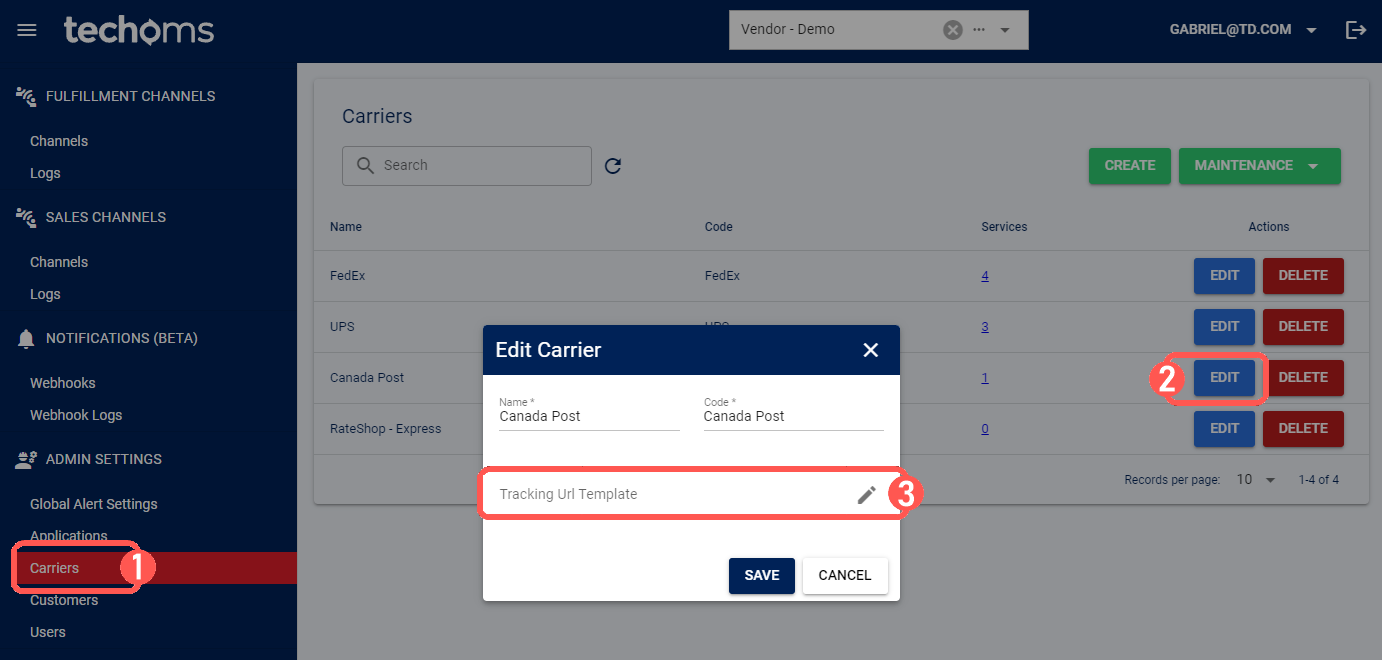
1) Click Carriers
2) Click Edit for the Carrier in question to open it
3) Click Edit for the Carrier URL field
4) Paste the tracking URL from the Carrier's site in the Template field; e.g. https://www.gls.com/tracking/
5) Select the Tracking Number variable from the Add to Template dropdown to complete the Template; e.g. https://www.gls.com/tracking/{TrackingNumber}
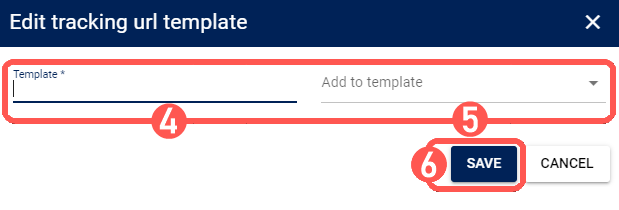

6) Press Save to apply the changes
7) Press Save in the Carrier view to complete the process