How to Configure Order-Level Aramex Settings [Guide]
Last updated: September 29, 2026
This guide explains how to configure Aramex-specific settings in the Carrier Options tab of an Order.
A Carrier Options tab configuration defines transaction-level behavior that applies only to the selected Order. These settings may vary depending on the selected service and shipment requirements.
 |
For a complete overview of supported carriers and related setup guides, refer to techSHIP supported Carriers - Master List [Guides List].
|
TABLE OF CONTENTS
Prerequisites
Before configuring the Order's Carrier Options tab, ensure that:
An Aramex Client (Billing) Account has been created.
The Order is available for editing in techSHIP.
Review and save the Carrier Options configuration before processing the shipment.
Carrier-Specific Options
The Carrier Options tab contains the Aramex-specific settings used for the Order.
In this view, the fields are grouped into Service, Accessorials, and Freight billing.
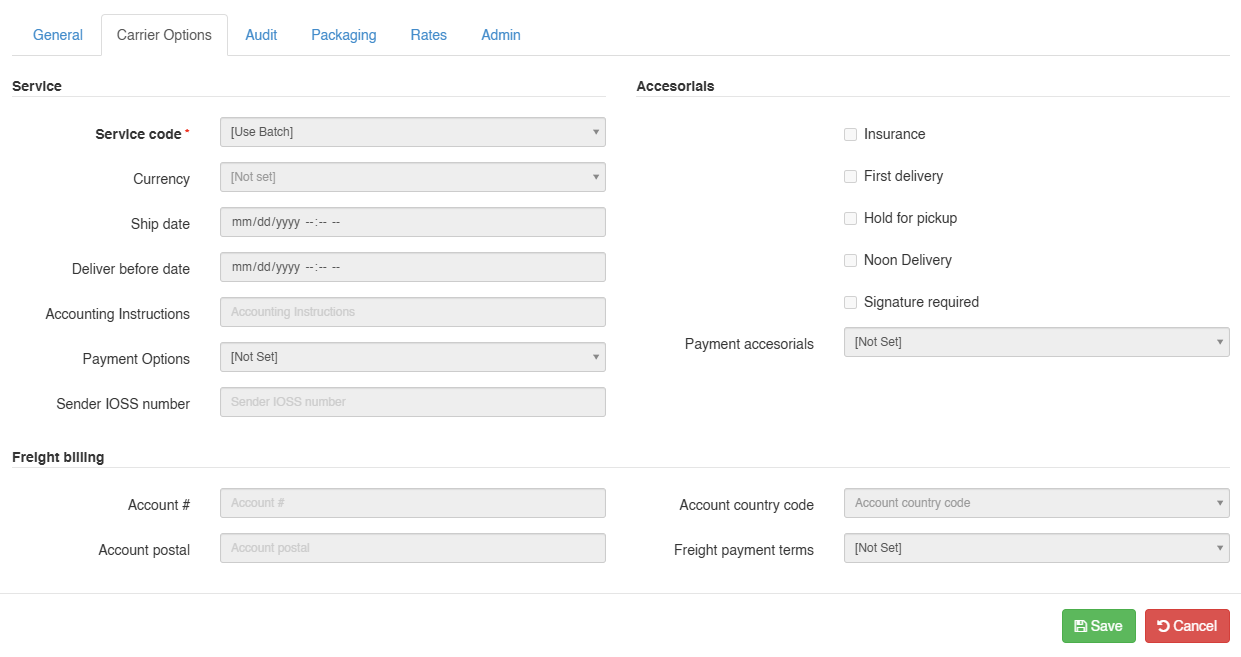
 | Service code: Select the service code for the Order. |
 | Currency: Select the currency for the Order. |
 | Ship date: Enter the ship date. |
 | Deliver before date: Enter the deliver-before date. |
 | Accounting Instructions: Enter the accounting instructions for the Order. |
 | Payment Options: Select the payment option for the Order. |
 | Sender IOSS number: Enter the sender IOSS number for the Order. When provided, this value is sent to Aramex as the IOSS customs clearance property. |
| |
For the Commercial Invoice, Aramex maps the header-level Origin of Goods from the shipment’s ship-from country. The line-level Country of Origin is mapped from each SKU/item country of origin.
|
 | Insurance / First delivery / Hold for pickup / Noon Delivery / Signature required: Select the applicable accessorial options for the Order. |
 | Payment accessorials: Select the payment accessorial for the Order. |
 | Account # / Account postal: Enter the freight billing account number and account postal code. |
 | Account country code / Freight payment terms: Select the account country code and freight payment terms. |
Next Steps
Review the configured Aramex Carrier Options, save the Order, and continue with shipment processing.