How to Restore a Deleted Account of an Organization [Step-by-step guide]
Last updated: September 29, 2026
You can restore a deleted account within an organization to re-establish all its data and resume its operations.


For information on deleting accounts, refer to How to Delete Accounts of an Organization [Step-by-step guide].
Restoring an account will re-establish all the settings to the previous configuration immediately:
- Restore access for all organizational and account users.
- Restore sales and fulfillment channels.
- Cancel the scheduled account deletion.
This action requires account management permissions. Refer to techOMS User permissions structure [Information] to verify your permissions.
To restore a deleted account:
1. Deselect any currently selected account.
2. Click Organizations from the left menu under the System Configuration section.
3. Press Edit for the desired organization.

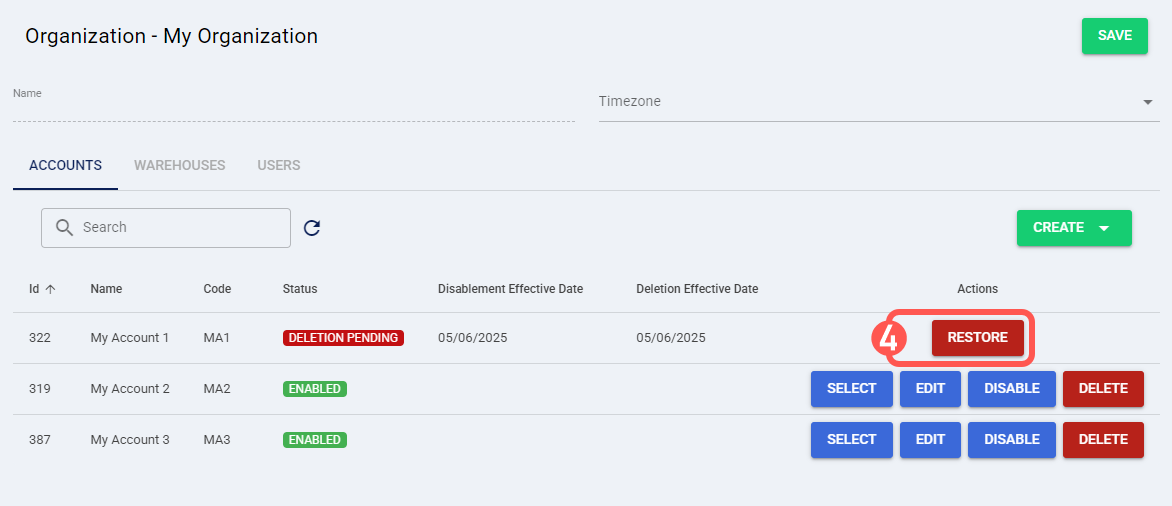
4. Press Restore for the desired account.
5. Click OK to restore the account immediately.
