Configuration Backups and Restore in techSHIP [Guide]
Last updated: October 9, 2026
Use configuration backups in techSHIP to recover supported pricing configuration from an earlier point in time.
This guide explains the supported entities, how backup availability works, how to review and apply a restore, how related configuration can affect the result, and what you should verify afterward.
Supported Entities
In this guide, a supported entity is one from whose page you can start Actions > Restore from backup.
Depending on the supported entity, related configuration (such as Pricing Dimensions, Zones & Areas, and Accessorial Collections) can participate in a restore as dependencies, but you cannot start an independent restore from those items.
Markup Profiles (beta)
You can restore a Markup Profile (beta) from a dated configuration snapshot by opening the profile and selecting Actions > Restore from backup.
When you restore a Markup Profile (beta), the profile itself is always included. Under What to restore, you can choose which descendant configuration sections to include:
Periods restores the profile periods captured in the selected snapshot.
Service Groups restores the service groups within the selected periods.
Services restores the services associated with the selected profile configuration.
Markup Items restores the applicable markup matrix configuration.
Surcharges restores the surcharges captured for the profile.
The available sections follow a parent-child hierarchy, so your selections can require additional parent or child configuration to keep the restored profile valid.
A Deleted Markup Profile is different from a Disabled Markup Profile. The standard Markup Profiles (beta) interface does not currently provide a verified self-service entry point for opening and restoring a deleted profile, so do not rely on this workflow to recover a deleted profile.
For instructions on locating the restore action, refer to 📄 How to Configure and Manage Markup Profiles in techSHIP [Step-by-Step Guide].
Custom Pricing Tables
You can restore a Custom Pricing Table from a dated configuration snapshot by opening the table and selecting Actions > Restore from backup.
When you restore a Custom Pricing Table, the table itself is always included. Under What to restore, you can choose which descendant configuration sections to include:
Rate Service Levels restores the service levels captured in the selected snapshot.
Rate Items restores the applicable rate matrix configuration.
The available sections follow a parent-child hierarchy, so restoring a descendant can require its parent configuration to remain in scope.
A restored Rate Service Level can return as unpublished when its restored configuration does not satisfy the current publication requirements, even when it was published in the selected snapshot.
For instructions on locating the restore action, refer to 📄 Mastering Smart Pricing in techSHIP [Guide].
How Configuration Backups Work
You use configuration backups to recover a supported organization-level entity configuration. A restore does not roll your entire Location back to an earlier state and does not modify other entities or transactional data.
You do not need to export configuration beforehand. techSHIP creates configuration snapshots through a scheduled nightly process, independently from spreadsheet exports and imports.
Backup Availability
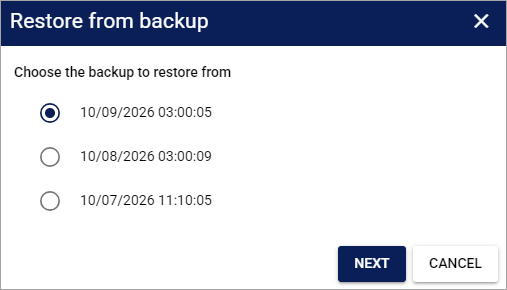
When you open Restore from backup for a supported entity, you can choose from the recent completed snapshots that contain that entity.
The picker displays up to three recent matching snapshots, with the newest available snapshot first.
A snapshot created before the supported entity existed does not appear.
A snapshot in which the supported entity was already removed can appear as Already deleted at that time and cannot be selected.
An Already deleted at that time entry can still count toward the three displayed snapshots, so you may see fewer than three selectable restore points.
The displayed date and time use the current Location time zone.
The dialog does not provide a calendar, paging control, or load-more option for browsing older restore points.
Before You Restore
You need specific restore authorization to use Restore from backup. Permission to edit a supported entity does not automatically grant permission to restore it; refer to 📄 techSHIP User Permissions Structure [Information] for the applicable access requirements.
Before you begin, confirm that you are working in the intended Location. Configuration can be shared at the organization level, so the Location you currently have open does not necessarily define the full impact of a restore.
A restore can replace current values, remove configuration created after the selected snapshot, and restore shared dependencies. Review the complete preview before you apply the restore because the result can affect configuration beyond the supported entity you originally opened.
You should also coordinate with anyone actively editing the same supported entity before you apply the restore. Do not assume that all affected screens automatically become read-only while you complete the operation.
Restore a Supported Entity from Backup
Select a Snapshot
Open the supported entity you want to restore and select Actions > Restore from backup.

In Restore from backup dialog, select the snapshot that represents the point in time you want to recover. The newest selectable snapshot is initially selected.
Click Next to compare the selected snapshot with your current configuration.
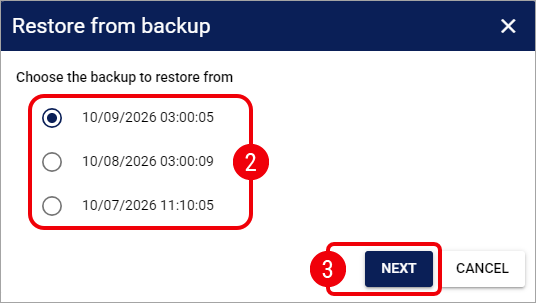
If no usable snapshot is available, you cannot continue the restore from this dialog. Once you select Next, review the configuration scope and proposed changes before you apply anything.
Choose What to Restore
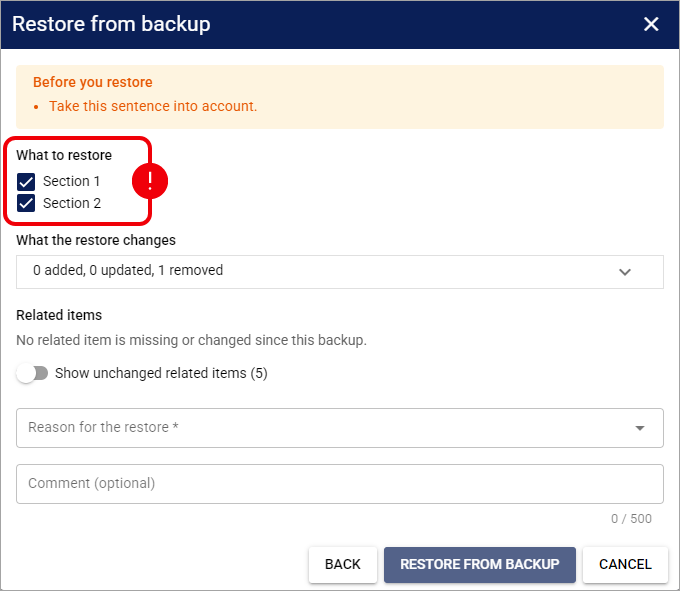
Under What to restore, you choose which descendant configuration sections to restore. The exact sections depend on the supported entity and are described under Supported Entities earlier in this guide.
The supported entity itself is always included. Your checkboxes select sections or types of descendant records, not individual rows, individual periods, or individual matrix cells.
All descendant sections are initially selected when you open the review step.
Clearing a parent section also clears its descendants.
Selecting a descendant section causes any required ancestors to remain included.
Changing your restore selections refreshes the preview so you can review the resulting effect.
Clearing a section does not guarantee that every current record in that section will remain. If the restore removes a parent that was created after the selected snapshot, its current descendants can also be removed. Use the final preview as the authoritative description of the result.
After you finish choosing the restore scope, continue by reviewing the differences that techSHIP will apply.
Review What the Restore Changes
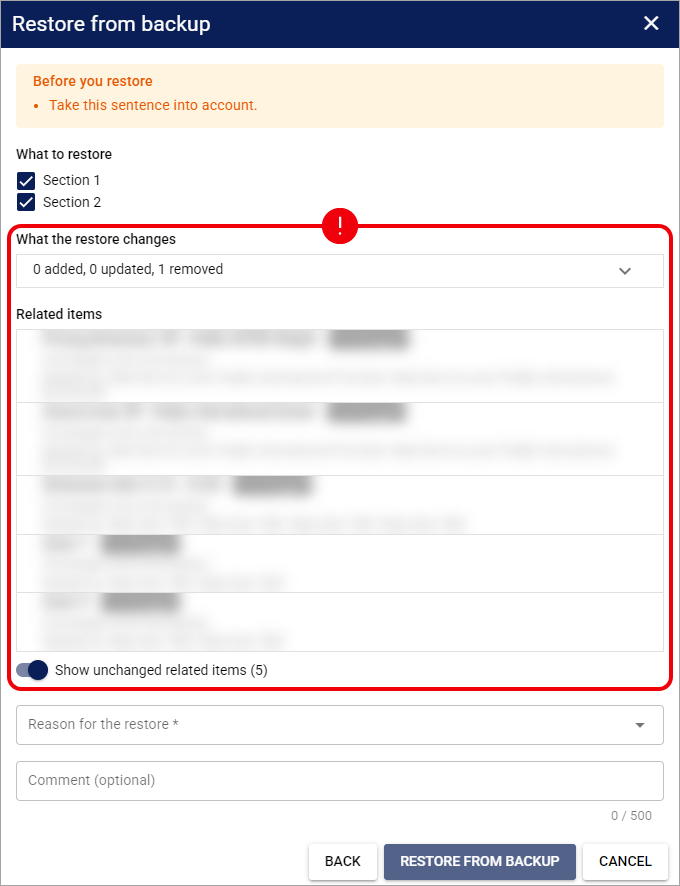
Use Changes to the item itself and What the restore changes to compare the selected snapshot with your current configuration.
Where applicable, the preview shows Field, Now, and After restore values and summarizes the configuration that will be added, updated, or removed.
For matrix-style configuration (such as Markup Items and Rate Items), the preview uses change counts rather than a complete cell-by-cell comparison. Other large groups can also display summarized results instead of every changed record.
If your current configuration matches the selected snapshot, the review displays Nothing differs from this backup. and does not offer an action to apply a no-change restore.
Once you understand the direct changes to the supported entity, review any dependencies listed under Related items before you continue.
Review Related Items
Use Related items to identify configuration that the supported entity depends on. Related items can include shared Pricing Dimensions, Zones & Areas, and Accessorial Collections.
A Missing related item is automatically included when it can be recovered from the selected snapshot. Excluding a required recoverable dependency blocks the restore.
A Changed related item keeps its current configuration unless you explicitly select it. Selecting it restores that dependency to its snapshot state.
An Unchanged related item remains unchanged and is hidden initially. Enable Show unchanged related items when you want to review these dependencies.
A Recreated Accessorial Collection with the same code can be retained instead of duplicating the older collection, and techSHIP warns you when this applies.
An Unavailable required dependency prevents the restore when the dependency is absent from both the current configuration and the selected snapshot.
When displayed, review Needed by to understand why a dependency is required and Restoring it also changes to identify additional configuration that can be affected.
Restoring a shared dependency can affect other supported entities that use the same configuration. Do not assume that the restore impact always ends with the entity you originally opened.
After you review all related items and warnings, continue to the final confirmation only when the preview represents the result you intend to apply.
Confirm the Restore
When the review contains changes that can be restored, select a required Reason for the restore:
Undo an unintended change
Revert a change that caused wrong rates
Roll back a test or trial configuration
Other
You can also enter a Comment (optional) of up to 500 characters to provide additional audit context. The comment remains optional when you select Other.
Select Restore from backup to apply the configuration shown in the preview. You do not need to select a separate Save action inside the restore dialog.
Use Back to return to snapshot selection or Cancel to close the dialog without applying the restore.
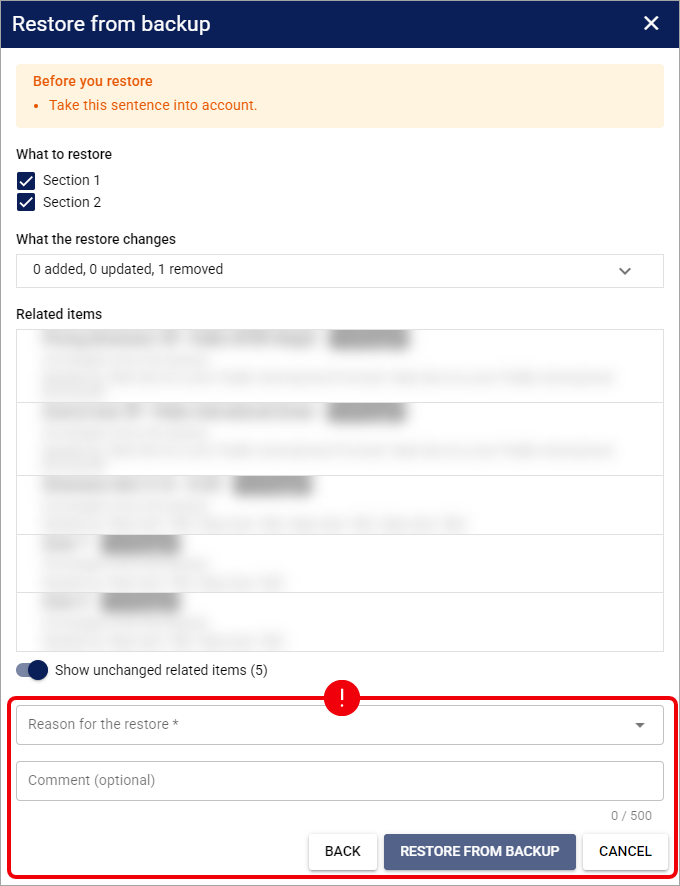
After Restore from backup completes successfully, inspect the restored configuration and its Change History before you resume normal configuration work.
When a Restore Can Be Blocked or Adjusted
A restore must satisfy the current configuration rules, so a supported entity is not always restored as an exact historical copy of the selected snapshot.
Invalid or unavailable dependencies can prevent the restore from continuing.
Conflicting codes or values, overlapping periods or ranges, and other invalid current-state combinations can block the restore.
A compatible schema difference can allow the restore to continue with a warning, while an incompatible change involving required structure, keys, or value types can prevent it.
For a Custom Pricing Table, a restored Rate Service Level can become unpublished if its resulting configuration does not meet the current publication requirements.
If the configuration changes after you review the preview, techSHIP can reject the apply and require you to open Restore from backup again so that you review the updated result.
When techSHIP blocks or adjusts a restore, review the displayed warning or validation message before you decide whether to correct the current configuration or select another available snapshot.
Verify the Restored Configuration
After the restore finishes, verify the resulting configuration before you continue using it.
Review the restored supported entity and confirm that its main settings match your intended result.
Review the descendant sections and related items that were included in the restore.
If the restored entity contains publication-controlled configuration, verify the resulting status, including any Rate Service Levels that may have become unpublished.
Open Change History and locate the Restored action.
The Restored entry records information about the completed operation, including the person who performed it, the execution time, the selected snapshot, the reason, the optional comment, restored sections, change counts, related dependencies, and applicable warnings.
You can also find additional restore detail on affected descendant or related configuration, rather than only in the supported entity's main history entry. For general audit instructions, refer to 📄 How to Review Change History Logs for Supported Entities [Step-by-Step Guide].
Once you confirm the restored configuration and Change History, you can resume normal pricing configuration or make any further authorized corrections that are required.
Restore Limitations
Keep these restore limitations in mind when you use configuration backups:
Restore from backup does not provide a dedicated Undo action and does not create an automatic snapshot immediately before you apply the restore. A later correction depends on another available snapshot or another authorized configuration change.
Configuration restore does not roll back transactional data, including historical orders, shipments, tracking records, or invoices.
The restore picker does not provide unrestricted access to older backups.
You cannot select a snapshot marked Already deleted at that time to recover the supported entity from that snapshot.
A deleted Markup Profile does not currently have a verified self-service restore entry point in the standard Markup Profiles (beta) interface.
A Disabled entity and a Deleted entity are different states, so do not treat disabling configuration as equivalent to removing it.