How to Synchronize Data Through a Fulfillment Channel [Step-by-Step Guide]
Last updated: November 12, 2026
Synchronizing information from a Fulfillment Channel helps you manage daily operations in techOMS by keeping Inventory Levels and Shipments up to date.
Use this guide to manually synchronize data from a Fulfillment Channel in techOMS.
To automate this process, refer to: 📄 How to configure Automations for Sales/Fulfillment channels [Step-by-step guide].
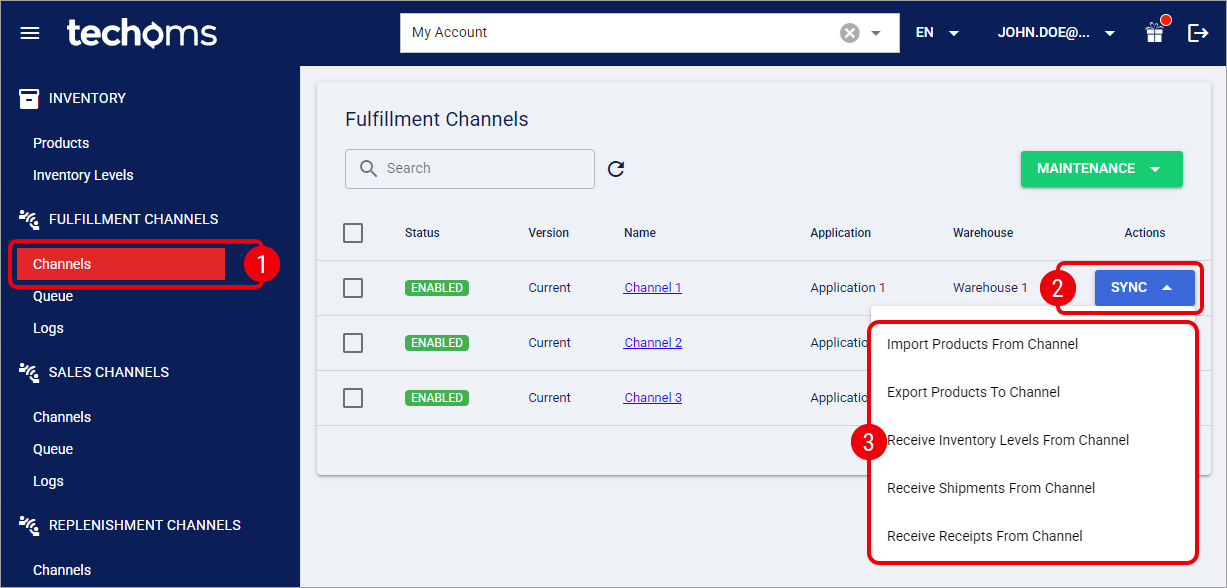
Click Channels from the left menu under the Fulfillment Channels section.
Press Sync for the Fulfillment Channel you want to sync with.
Select the synchronization operation to perform:
Import Products from Channel: Imports the Products from the connected Fulfillment Channel.
Export Products to Channel: Exports the Products from techOMS to the connected Fulfillment Channel.
Receive Inventory Levels from Channel: Receives Inventory Levels from the connected Fulfillment Channel.
Receive Shipments from Channel: Receives Shipments from the connected Fulfillment Channel.
When Backorder Mode is set to Manage in Fulfillment Channel, successive partial shipment confirmations can be processed as separate related Shipments in techOMS. For more information, refer to 📄 Understanding Backorders in techOMS [Information].
During Product synchronization, techOMS applies Product matching and validation rules. If one Product cannot be processed because of a validation conflict, techOMS reports the error for that item and continues processing other valid Products. For detailed conceptual information and advanced configuration, refer to 📄 Understanding the techOMS Master Product Source [Information].
During synchronization, techOMS automatically applies any configured SKU Mappings translation. For more details, refer to: 📄 How to Map SKUs in a Fulfillment Channel [Step-by-Step Guide].
If the Fulfillment Channel reports a shipped quantity of zero (0), techOMS automatically sets the shipment status to Cancelled. If this occurs unexpectedly, verify that the items were correctly fulfilled in the Fulfillment Channel.
When receiving shipment confirmations, techOMS automatically maps the sequential shipment line numbers back to the original Sales Order structure. To learn more about this reconciliation process, refer to 📄 Understanding Shipment Line Numbering and Reconciliation [Information].
During catalog synchronization, any product imported from a Fulfillment Channel with a description exceeding 4096 characters will trigger a validation error and fail to import into techOMS. The system does not automatically truncate oversized descriptions during this process.
Receive Receipts from Channel: Receives Receipts from the connected Fulfillment Channel.
techOMS automatically manages option availability based on:
Your Master Product Source (see: 📄 Understanding the techOMS Master Product Source [Information])
Features supported by the specific Fulfillment Channel (see 📄 techOMS Fulfillment Channels - Master List [Guides List]).
These actions directly update your Inventory Levels and Order Statuses in techOMS. For more information, refer to:
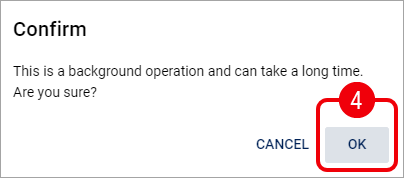
Click OK to begin the process.
Synchronization time may vary depending on the amount of data.
After starting the synchronization, techOMS displays a notification in the top-right corner of the screen:
