How to View the Expected Delivery Date (EDD) [Step-by-Step guide]
Last updated: October 29, 2026
Once a shipment is created, you can view its Expected Delivery Date (EDD) in techTRACK. The displayed date may come directly from the Carrier, be calculated by the integration from Carrier data, or use the Deliver By Date from techSHIP as a fallback when available.
This guide explains how to locate the EDD and how to interpret estimates provided by specific supported Carrier integrations.
Do not treat the EDD as a guaranteed delivery time. Its timezone and interpretation depend on the date source and the information available for the shipment.
EDD availability depends on the supported Carrier integration and the shipment data available. For details, see 📄 techTRACK & techAUDIT Supported Carriers - Master List [Guide].
Carrier-Specific EDD Details
Some Carrier integrations calculate or interpret the EDD differently. The following details explain how you should interpret estimates for specific supported integrations.
Freightcom
For Freightcom v1, the integration can calculate the EDD when the Carrier provides a positive transit-day value. It calculates from the shipment's induction date when available and otherwise from the shipment date before induction. The calculation counts Monday through Friday and does not exclude public holidays.
If the Carrier provides zero transit days or no transit-day value, no calculated EDD is produced. The resulting EDD is an estimate based on transit data, not a delivery appointment or shipment-specific promise from the Carrier. Do not assume this behavior applies to Freightcom v2.
Dicom
For Dicom, the integration can calculate the EDD using induction information and route transit information. When transit days are added, the calculation counts Monday through Friday and does not exclude public holidays.
A Dicom route estimate reflects transit information for the applicable route and is not a shipment-specific commitment issued by the Carrier. Depending on the available induction data, a subsequent tracking synchronization may be required before the estimate appears.
Evri
For Evri, the EDD represents the end of a carrier-provided delivery window. You should interpret this value as an estimated delivery date, not as confirmation that a delivery event has already occurred.
Australia Post
For eligible international Australia Post shipments, the integration can calculate the EDD using an estimated delivery window and displays the end of that window. Do not expect this calculated estimate for ordinary domestic Parcel Post or Express Post services.
Fleetoptics
For Fleetoptics, a calculated EDD requires the shipment's induction information and usable origin and destination postal codes. If the available Service estimates do not agree on one valid delivery date, no calculated EDD is provided, even though tracking can still update successfully.
Mainfreight
For Mainfreight, a calculated EDD requires the shipment's induction information and usable origin and destination postal codes. If the required transit information does not return a valid delivery date, no calculated EDD is provided, even though tracking can still update successfully.
Chronopost
For Chronopost, the calculated EDD uses French-network transit information. You should not treat this value as a validated international ETA.
TNT France
For the TNT France domestic integration, the EDD depends on the Carrier status including the expected delivery date while the shipment is in transit. If techTRACK first checks the shipment after completion, the EDD may be unavailable because that estimate may no longer be present in the Carrier status.
View the Expected Delivery Date
To view the EDD:
Open the tracking details.
For instructions on opening tracking details, see 📄 How to View Tracking Details [Step-by-Step guide].
Locate the Expected Delivery Date field.
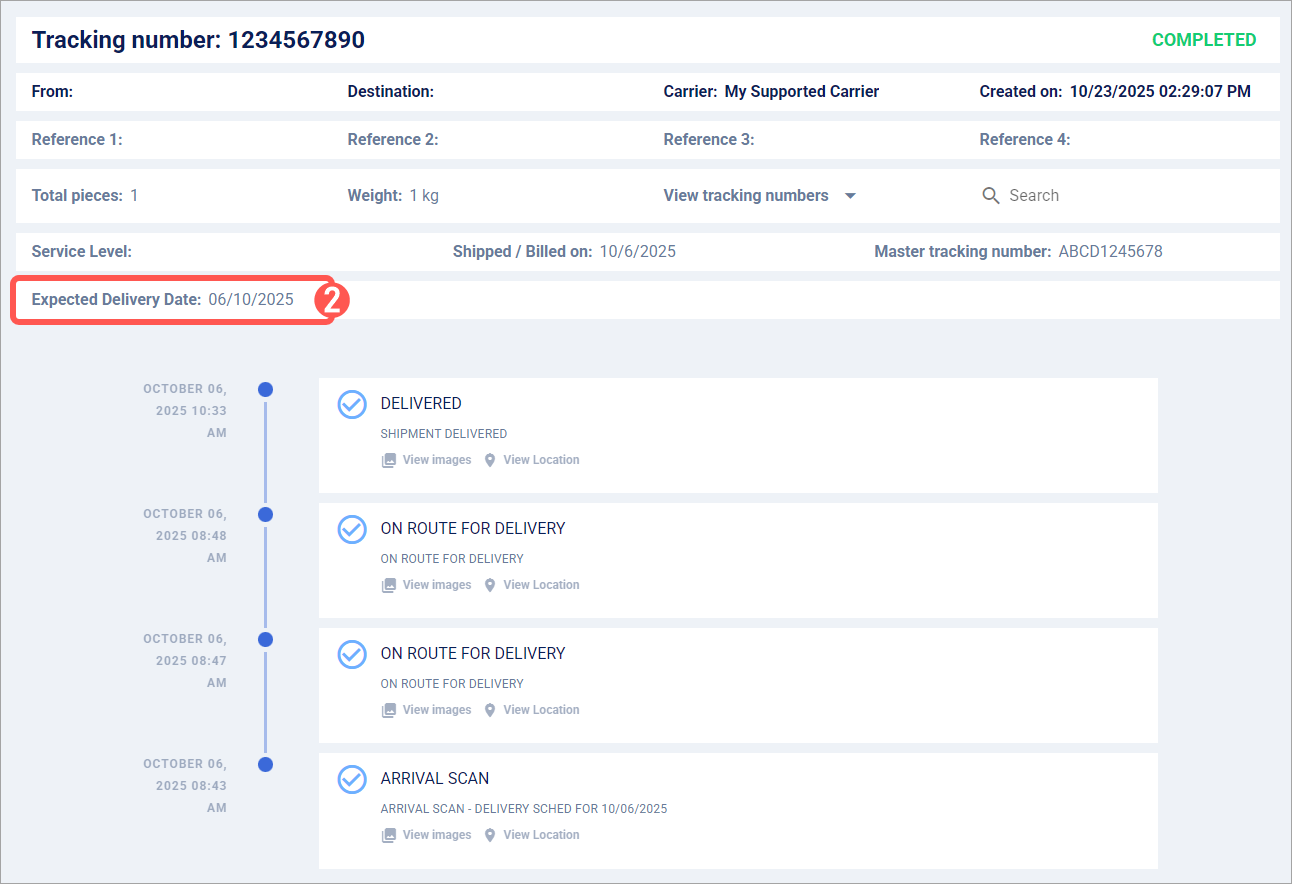
You can now review the shipment's Expected Delivery Date. If no value is shown, confirm whether the integration supports EDD in 📄 techTRACK & techAUDIT Supported Carriers - Master List [Guide] and, for calculated estimates, allow for a subsequent tracking synchronization when applicable.