How to Configure Inventory Synchronization for a Beta Sales Channel [Step-by-Step Guide]
Last updated: September 29, 2026
When setting up a beta sales channel, you may need to define how inventory is synchronized between techOMS and that specific channel. Use this guide to learn about the available synchronization modes and how to configure them.

This article is divided in the following sections:
- Inventory Synchronization Options
- Inventory Synchronization with Sales Channel
- Duplicate SKUs Synchronization
- How to Configure Inventory Synchronization
I. INVENTORY SYNCHRONIZATION OPTIONS
The following subsections detail all inventory synchronization-related options.
i. Inventory Synchronization with Sales Channel
The available inventory synchronization options are:
- Do not Synchronize: techOMS does not send inventory updates to the sales channel (except during manual syncs).
- Real-Time Adjustment: Sends real-time incremental updates as they occur (e.g., +3 SKU A, -5 SKU B).
NOTE: Real-Time Adjustment may include eligible Bundle SKU quantity changes; it does not push Sales Channel inventory back into the Fulfillment Channel. For detailed conceptual information and advanced configuration, refer to Understanding Inventory Levels and Order Status Impact [Information].
- Synchronize With Fulfillment Channel: Sends full inventory values based on fulfillment data, either manually triggered or on an automated schedule (e.g., 98 SKU A, 27 SKU B).
The table below outlines whether inventory will synchronize in different scenarios, based on the selected mode:
| SCENARIO | OPTIONS | ||
| TRIGGER/MODE | DO NOT SYNCHRONIZE | REAL-TIME ADJUSTMENT | SYNCHRONIZE WITH FULFILLMENT CHANNEL |
| Fulfillment Channel Recurring Job |  |  | |
| Fulfillment Channel Manual Sync |  |  | |
| Sales Channel Manual Sync |  |  |  |
| Import Inventory Level |  | ||
| Adjust Inventory Manually |  | ||
| Receive Receipt |  | ||
| Allocate Order from the same channel | |||
| Allocate Order from other channel |  | ||
| Cancel Shipment |  | ||
| API v2 (Bulk Update) |  |  | |
| API v2 (Single Row Update) |  | ||
ii. Duplicate SKUs Synchronization

You can control how inventory is updated for products with identical SKUs using the Duplicate SKU - update inventory when duplicate skus are found field:
- No (default): If duplicate SKUs are found during inventory synchronization, techOMS skips updating their inventory.
- Yes: techOMS updates inventory values for all SKUs, regardless of duplication.
WARNING: Enabling this setting may lead to overselling.
When a product with a duplicate SKU is sold, inventory updates for its duplicates may not be immediately reflected in Shopify. However, techOMS will automatically correct any discrepancies during the next inventory synchronization cycle.
Additionally, enabling this option automatically changes the Inventory Synchronization with Sales Channel setting to Synchronize with Fulfillment Channel.
II. HOW TO CONFIGURE INVENTORY SYNCHRONIZATION
To configure inventory synchronization for a beta sales channel:
1. Select the desired account from the header switcher.
2. Click Channels from the left menu under the Sales Channels section.
3. Click on the sales channel name.

4. For each Type field, select the desired Mode:
- Inventory Synchronization with Sales Channels: see a. Inventory Synchronization with Sales Channel in the previous section.
WARNING: Your sales channel may enforce API limitations depending on your subscription level. Ensure you select the appropriate option for your use case.NOTE: If you select Synchronize With Fulfillment Channel and need to adjust its synchronization frequency, follow the steps in How to configure Automations for Sales/Fulfillment channels [Step-by-step guide] for the relevant fulfillment channels.
- Duplicate SKU - update inventory when duplicate skus are found: see b. Duplicate SKUs Synchronization in the previous section.
5. Press Save.
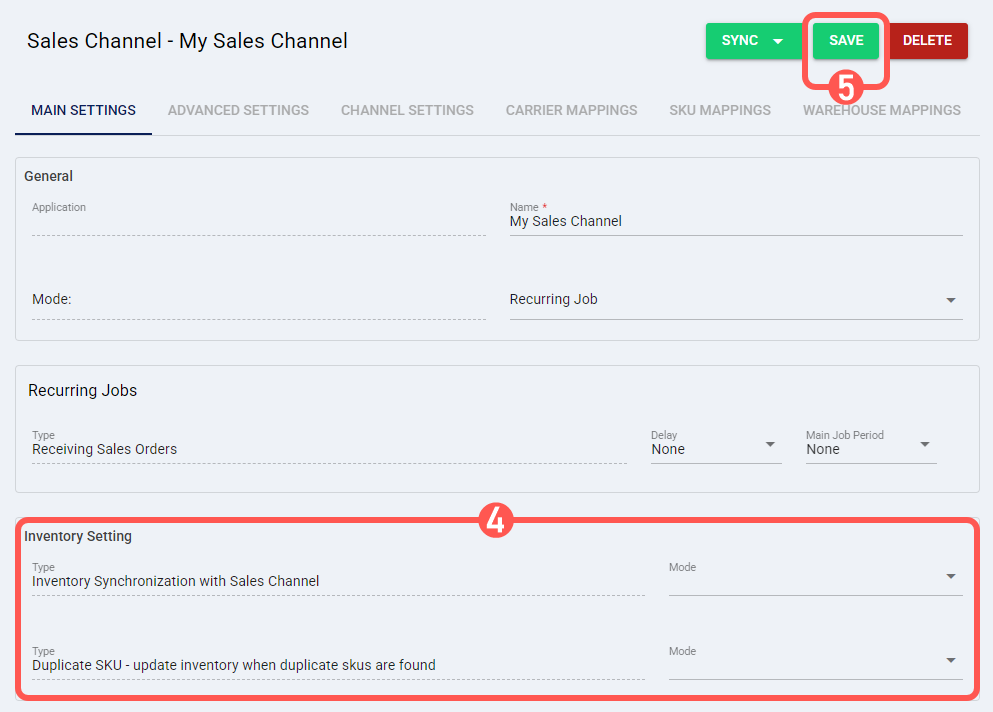
Your beta sales channel is now configured with the selected inventory synchronization strategy.