How to Configure Inventory Synchronization for a Fulfillment Channel [Step-by-Step Guide]
Last updated: November 11, 2026
When you configure a Fulfillment Channel in techOMS, you can define how inventory is synchronized through the Inventory Synchronization Mode setting.
This guide covers the available inventory synchronization modes and how to configure the appropriate option for your Fulfillment Channel.
Inventory Synchronization Options
You can use the Inventory Synchronization Mode option to select how inventory is synchronized for your Fulfillment Channel:
Manual: Uses the Manual inventory synchronization mode.
Manual synchronization during active order processing may cause inventory discrepancies; use it during low-activity periods.
Real-Time Adjustment (Webhooks): Receives inventory adjustments through the existing webhook mechanism instead of polling inventory on a schedule.
This mode applies incoming inventory changes as signed quantity adjustments: positive values increase inventory, and negative values decrease it. It does not replace the current inventory quantity with an absolute balance.
This option does not automatically perform a daily full inventory synchronization or reconcile inventory against a complete external stock balance.
When the connected Fulfillment Channel provides an adjustment reason, techOMS retains it in the inventory adjustment records and business logs. Inventory updates that contain only an absolute balance or no valid quantity adjustment are rejected and recorded in the Fulfillment Channel logs.
To use the Real-Time Adjustment (Webhooks) option, Webhooks must be configured as detailed in 📄 How to set up Sales/Fulfillment Channel Webhooks [Step-by-step guide].
Scheduled Full Synchronization (24h): Performs a full inventory synchronization every 24 hours.
Scheduled Inventory Adjustments (15 min): Polls signed inventory adjustments using fixed 15-minute time windows.
Positive adjustments increase inventory, while negative adjustments decrease it. This mode does not automatically perform a daily full inventory synchronization.
When the Fulfillment Channel provides an adjustment reason, techOMS retains it in the inventory adjustment records and business logs.
Scheduled Inventory Adjustments (15 min) is available only for Fulfillment Channels that support this capability.
techOMS does not schedule inventory adjustment pulls during the associated warehouse's quiet hours, which are evaluated using that warehouse's timezone. Skipped quiet-hour intervals are not automatically recovered.
The 15-minute interval is fixed, is not configured through Recurring Jobs, and does not represent a guaranteed 15-minute update time for connected Sales Channels.
How to Configure Inventory Synchronization
To configure inventory synchronization for your Fulfillment Channel:
Go to Fulfillment Channels > Channels.
Open the desired Fulfillment Channel.
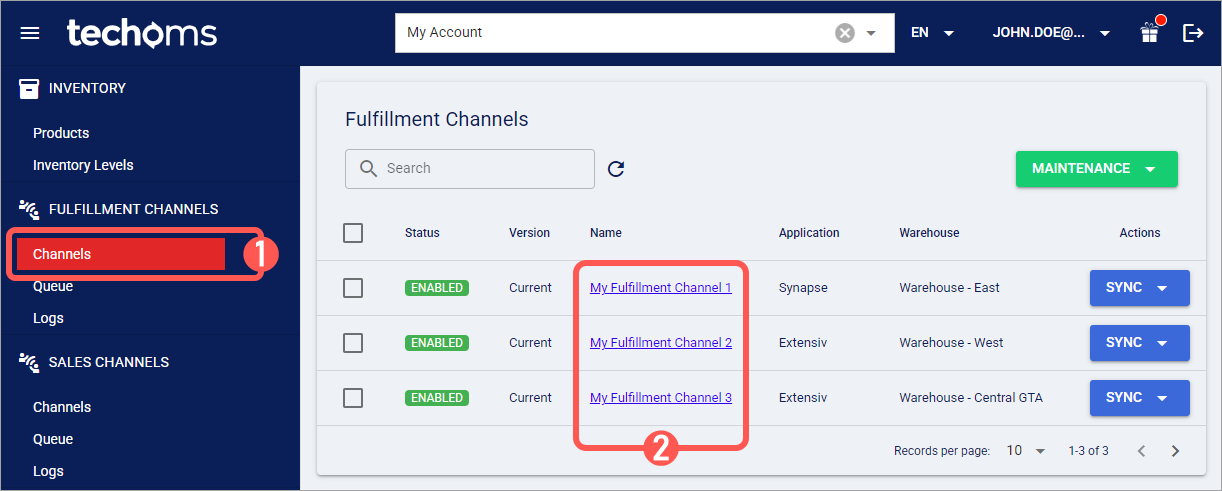
Under Main Settings, locate the Inventory Setting section.
Open Inventory Synchronization Mode and select the desired Mode.
If you select Scheduled Incremental Synchronization (15 min), confirm that the associated warehouse has the appropriate timezone and quiet hours configured.
Click Save to apply the selected inventory synchronization mode.
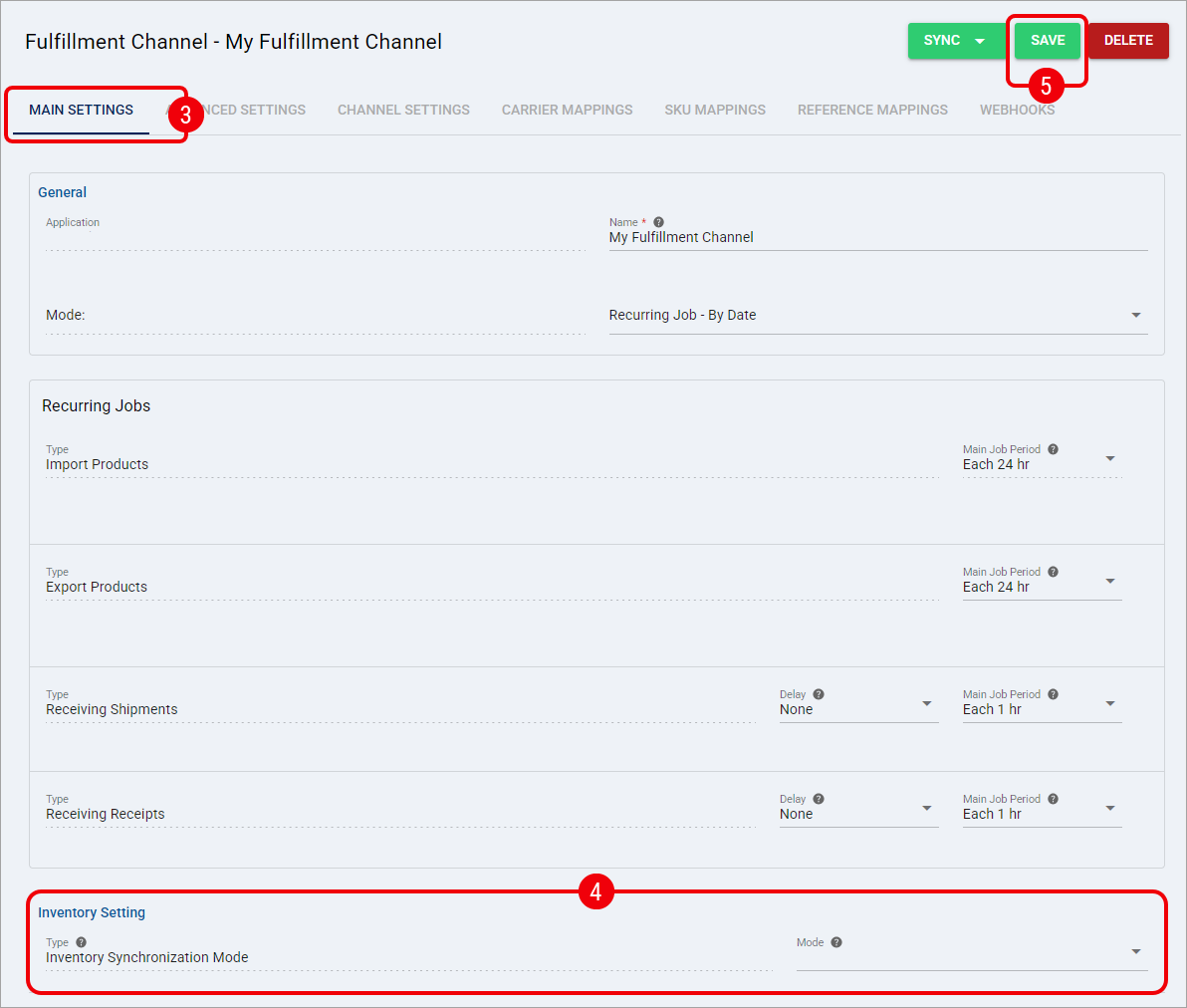
After you click Save, your Fulfillment Channel uses the selected Inventory Synchronization Mode.