Understanding International Item Fields for Customs and Compliance [Information]
Last updated: October 26, 2026
When managing Items in techSHIP, you can define attributes used for international shipping, customs classification, product identification, and Carrier compliance. These fields support different requirements, from assessing tariffs and customs charges to supplying product identifiers for applicable cross-border shipments.
This article explains the purpose and function of the fields on the International tab, available when adding or editing an Item through either a Client's Items tab or the Products / Items catalog.
Overview and Purpose
To access these fields, open the International tab when adding or editing an Item and select the Enable International checkbox.
You can access the International tab from either of the following locations, depending on how you manage your Items:
Client-specific Items. For detailed instructions, refer to 📄 How to Manually Set Up Items for a Client [Step-by-Step Guide].
Items used across multiple Clients. For detailed instructions, refer to 📄 Global Item Maintenance: Managing Items Across Multiple Clients [Guide].
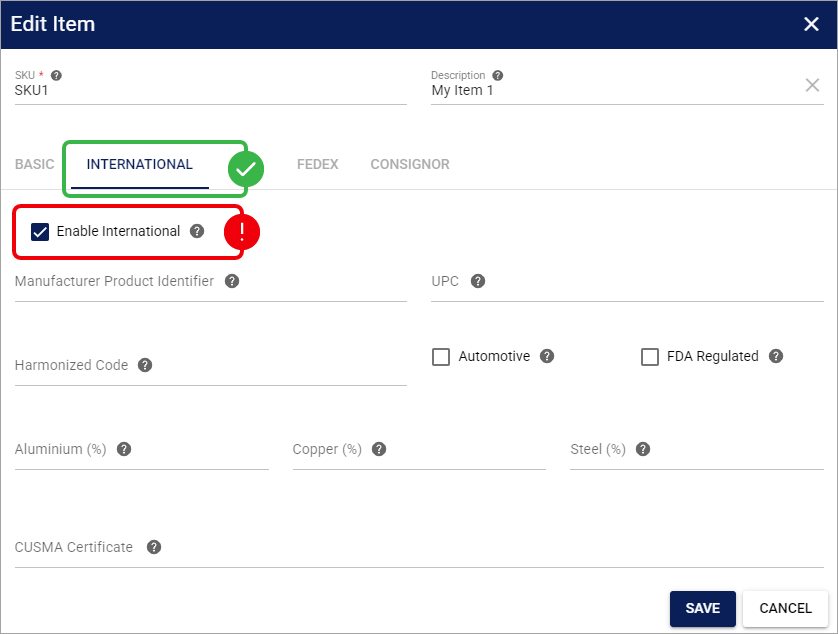
Clearing Enable International hides the Manufacturer Product Identifier and UPC fields without deleting their saved values. This preservation behavior is specific to these two identifiers and should not be assumed for every field on the International tab.
The International tab supports several types of cross-border requirements:
Customs classification and tariffs: Fields such as Harmonized Code, Automotive, and metal allocations help participating Carriers determine applicable customs charges and material tariffs, particularly for shipments entering the United States.
Regulatory compliance: FDA Regulated identifies products subject to U.S. Food and Drug Administration requirements, while CUSMA Certificate supports applicable origin documentation.
Product identification: Manufacturer Product Identifier and UPC provide product-level identification information required by certain Carriers for applicable international shipments, including EU imports.
The information used depends on the selected Carrier, its integration capabilities, and the shipment's applicable requirements. Check your configured carrier support by referring to its corresponding documentation listed in 📄 techSHIP supported Carriers - Master List [Guides List].
Missing or inaccurate customs classification or tariff-related information may result in unexpected customs charges or additional processing for applicable shipments. Providing Manufacturer Product Identifier or UPC does not, by itself, reduce tariffs or guarantee shipment acceptance.
Field Definitions
The International tab contains the following fields.
Manufacturer Product Identifier
The Manufacturer Product Identifier is the non-standardized identifier (NS-PID) assigned to a product by its manufacturer, such as a model number, part number, or style number.
Format: Text, including alphanumeric values and leading zeros.
Maximum Length: 255 characters.
Required: No. You can leave this field empty in the Item catalog.
techSHIP does not automatically copy the SKU into the Manufacturer Product Identifier field. Enter the manufacturer's actual identifier when it is available.
UPC
The UPC field stores the standardized product identifier (S-PID). This field accommodates different standardized identifiers, including UPC, EAN, GTIN, and ISBN.
Format: Text, preserving leading zeros.
Maximum Length: 255 characters.
Required: No. You can leave this field empty in the Item catalog.
The International tab does not include a separate selector for the standardized identifier type.
Although Manufacturer Product Identifier and UPC are optional in the Item catalog, a Carrier may require them for a particular shipment. Storing these values does not independently validate their correctness or guarantee shipment acceptance.
For details on EU applicability, identifier sourcing strategies, and how catalog values populate order lines, refer to 📄 Understanding EU Product Identifiers in techSHIP [Information].
Harmonized Code
The Harmonized Code is the Harmonized Tariff Schedule (HTS) code for the product. It is a standard numerical code used by customs authorities worldwide to classify traded products.
techSHIP uses this code to populate customs information for international orders.
Automotive
The Automotive checkbox identifies whether the item is an automotive part. This flag helps Carriers assess tariffs when certain HTS codes may be ambiguous.
Checked: The item is considered an automotive part.
Unchecked: The item is not considered an automotive part. This is the default setting.
FDA Regulated
The FDA Regulated checkbox identifies whether the item is regulated by the U.S. Food and Drug Administration (FDA).
When selected, this flag allows techSHIP to prevent rates from being returned by Carriers that do not accept FDA-regulated products, helping you avoid potential shipment rejections at the border.
Metal Allocations (Aluminium, Copper, Steel)
The Aluminium (%), Copper (%), and Steel (%) fields allow you to specify the percentage of these metals within the item.
Carriers use this information to assess applicable material tariffs and customs charges. You can enter decimal values, such as 25.5.
The combined value of Aluminium (%), Copper (%), and Steel (%) cannot exceed 100%. This validation rule is also enforced during Item import.
CUSMA Certificate
The CUSMA Certificate field allows you to upload a Canada-United States-Mexico Agreement (CUSMA) Certificate of Origin for the item.
For detailed instructions on attaching and managing this certificate, refer to 📄 How to Attach and Manage a CUSMA Certificate of Origin to an Item [Step-by-Step Guide].