How to set up a ShipStation Sales Channel [Step-by-step guide]
Last updated: September 29, 2026
To connect ShipStation, you will have to, first, create a Sales Channel connection, and then, set up the connection parameters.
Once the connection has been established between the system and techOMS, you will be able to push and update Sales Orders, get stock updates and synchronize inventory.
The process consists in two phases:
1) Create the channel
2) Configure additional parameters


CREATE CHANNEL
To create a Sales Channel you will have to follow the instructions in How to Create a Sales Channel [Step-by-step guide]
Once you have added it, proceed to the following section.
CONFIGURE ADDITIONAL PARAMETERS
To configure additional parameters:
1) Click on the created channel's name in the list

2) Add/Change/Set parameters according to each section as required (click to enhance):
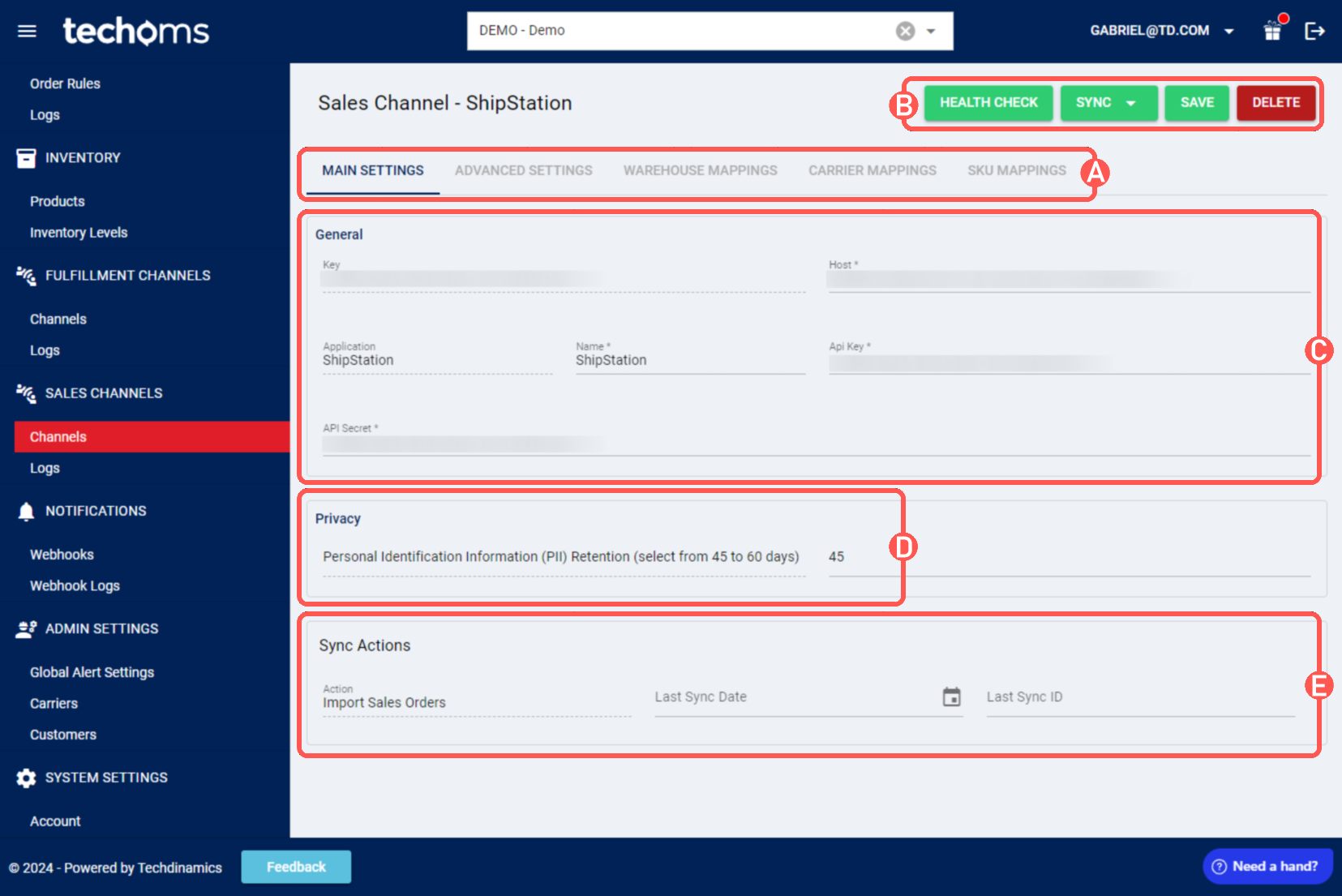
SECTIONS
A) VIEW SELECTION, allows to change the different view modes:
- Main settings (default): Allows to review and set the basic connection settings
- Advanced Settings: Allows to define system specific options (order inventory options, timezone, Units of Measurement, earliest order date, etc.); review this article for additional information: How to manage Sales Channels Advanced settings [Step-by-Step guide]
- Warehouse Mappings: Allows you to bind or modify the connection to a specific warehouse instance
- Carrier Mappings: Allows to review and set Carrier name mappings between the Sales Channel connection and techOMS as detailed here: How to map Carriers in a Sales Channel [Step-by-step guide]
- SKU Mappings: Allows to review and set SKU mappings between the Sales Channel connection and techOMS as detailed here: How to map SKUs in a Sales Channel [Step-by-step guide]
B) QUICK ACTIONS, allows to perform additional/quick actions:
- Health Check: Verifies if the connection is active or not
- Sync: Allows to manually synchronize different elements between both systems
- Receive Sales Orders from Channel
- Send Inventory Levels to Channel
- Import Products from Channel
- Export Products to Channel
- Save: Saves and commits changes
- Delete: Deletes the channel connection
C) GENERAL, displays and/or allows to edit:
- Application & Key (locked): Connection type and key
- Connection name: Display name for the connection, can be edited if required for more convenient identification if there are many
- Host: URL of the connection, can be edited if the URL is changed at any point
- API Key and Secret: API Key and password
D) PRIVACY, displays and allows to set/modify the Personal Identification Information retention threshold
E) SYNC ACTIONS, displays information about the synchronization actions and last activity, as well as allowing manual logging
