How to get FedEx invoices to import into techAUDIT [Step-by-Step guide]
Last updated: September 29, 2026
When importing invoices, you will need to select the files you will push into techAUDIT.
To select them, you will need to download them from FedEx first.
This process will detail how to obtain the invoices from the FedEx Billing portal.

To download the invoices you will have to:
1. Access https://www.fedex.com/en-us/logged-in-home.html and log in with your FedEx credentials
2. Click the Main menu
3. Select View & Pay bill

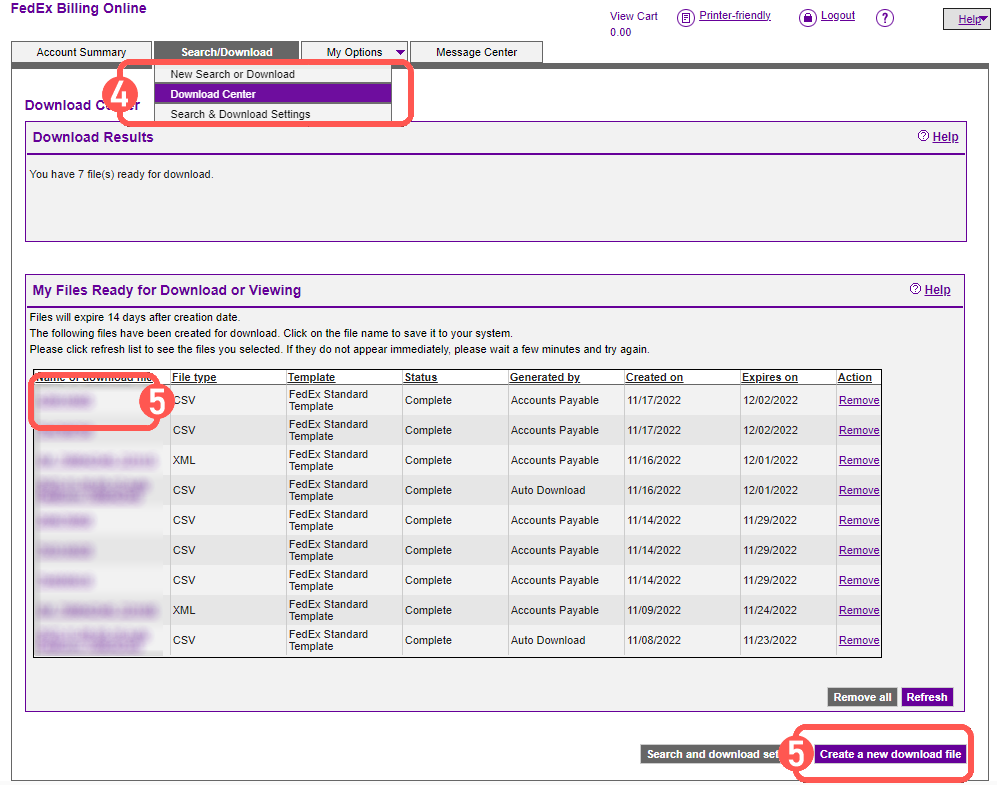
4. Select Download Center after switching to the tab Search/Download
5. Select the invoice(s) you wish to download (only CSV format supported)or Create a new Download file if the invoice(s) you're looking for is not in the list
Once ready, will download a CSV file, which you can use to import into techAUDIT.