How to Mark Sales Orders as Shipped [Step-by-Step Guide]
Last updated: September 29, 2026
You can mark sales orders as shipped to prevent any additional shipments.
To do so, the orders must be in the fulfilling state, and none of the associated shipments can have the status ready to send or sent to warehouse.
When you perform this action, any allocated but unfulfilled inventory will be released. Additionally, the order will be closed on the sales channel, and any held shipment will be pushed back to it, if applicable.


This article is divided into the following sections:
- Marking a batch of sales orders as shipped
- Marking a single sales order as shipped


I. MARKING A BATCH OF SALES ORDERS AS SHIPPED
To mark a batch of sales orders as shipped:
1. Find the desired sales orders by clicking on Sales Orders from the left menu and using the provided filters.

2. Select the desired orders by checking the checkboxes next to them.
3. Press Actions.
4. Click Mark Orders as Shipped.

5. Click OK.
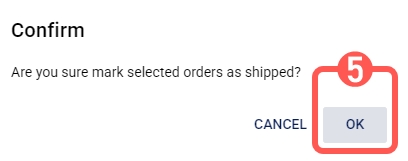
As a result, a message displaying the outcome will appear.

Failed selected orders, if any, will be recorded in the sales order processing log.
II. MARKING A SINGLE SALES ORDER AS SHIPPED
To mark a single sales order as shipped:
1. Find the desired sales order by clicking on Sales Orders from the left menu and using the provided filters.
2. Click the desired sales order number.

3. Press Action.
4. Click Mark Order as Shipped.

5. Click OK.

As a result, a message displaying the outcome will appear.

If failed, the result will be recorded in the sales order processing log.