How to Edit a Product Variant or Details [Step-by-Step Guide]
Last updated: October 30, 2026
When performing maintenance tasks, you may need to edit an existing Product Variant or a Product's details.
This guide covers how you can modify these details in techOMS.
If techOMS is not set as your Account's Master Product Source, we recommend making changes directly in your Master Product Channel instead of using this procedure. For more information on the Master Product Source feature, see: 📄 Understanding the techOMS Master Product Source [Information]
Otherwise, be aware that changes made here:
Will propagate to your non-master channels.
Will not sync back to your designated Master Product Channel.
May be overwritten during future synchronizations from the Master Product Channel.
Proceed with caution.
Product Variant Interface
This section details the available Product Variant fields and options.
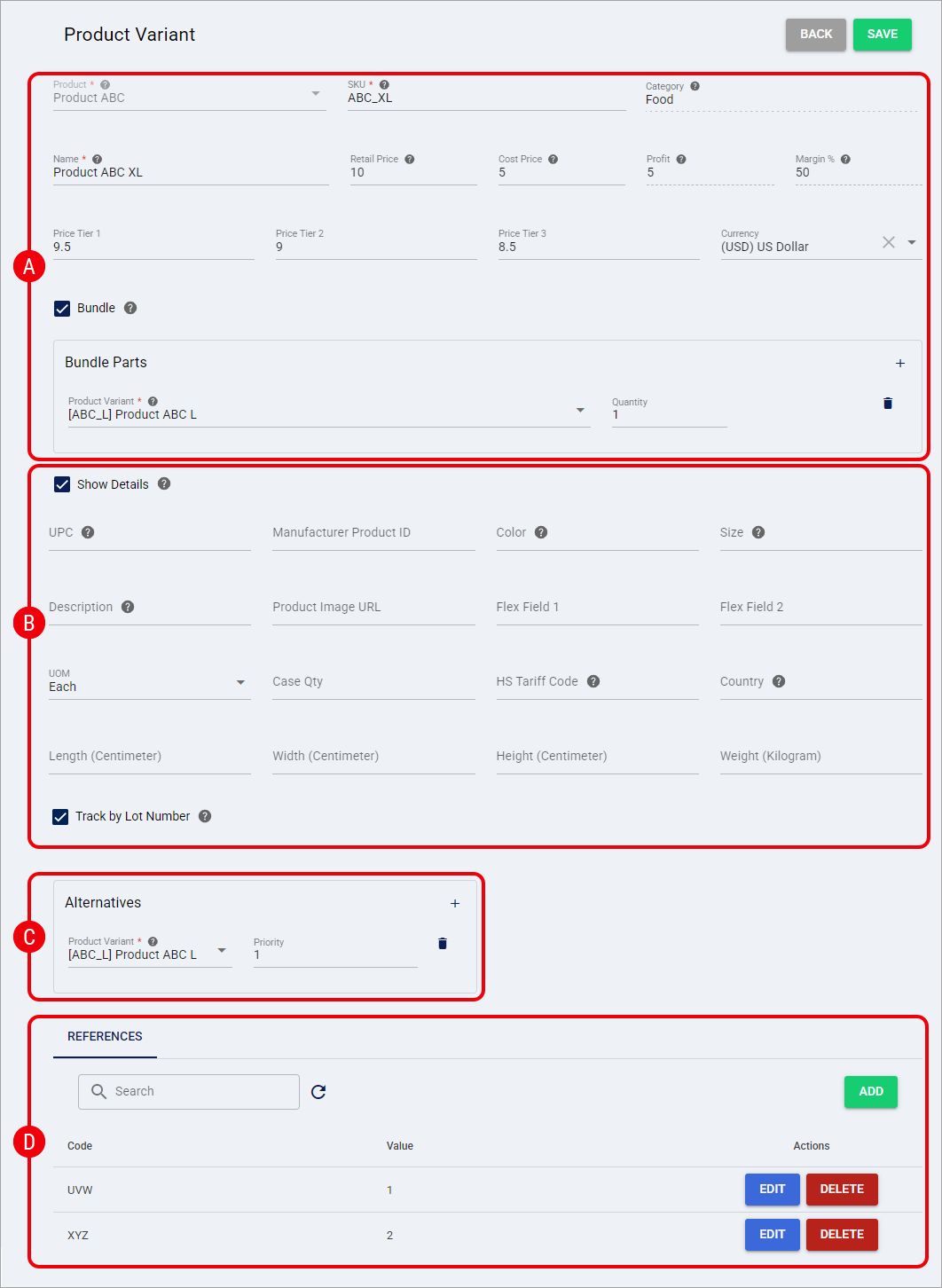
A — General Information: Review and modify the General Information fields for the Product Variant:
Product: Main Product name (Read-Only).
Category: Displays the Category assigned to the parent Product. This field is read-only and cannot be changed from the Product Variant page. For more information, refer to 📄 How to Edit a Product [Step-by-Step Guide].
SKU: SKU Code.
Name: Variant name.
Retail Price: The selling price of the Product (Optional; defaults to 0 if blank).
Cost Price: The cost of the item (Optional; defaults to 0 if blank).
Profit: (Read-only) The calculated difference between Retail Price and Cost Price.
Margin %: (Read-only) The calculated percentage of profit.
Price Tier 1: Tiered pricing value (Optional).
Price Tier 2: Tiered pricing value (Optional).
Price Tier 3: Tiered pricing value (Optional).
Currency: Dropdown to define the currency code for the pricing fields (Optional).
Bundle: If checked, it indicates the SKU is part of a Bundle.
B — Show Details: Review and modify the Show Details expanded fields. Check Show Details to display and modify the following:
UPC: UPC number.
Manufacturer Product ID: The manufacturer's product identifier associated with the individual Product Variant. This field accepts a maximum of 255 characters.
Color: Variant color.
Size: Non-dimensional size (e.g., S, M, L, XL, XXL).
Description: Product description. The maximum character limit in techOMS is 4096 characters.
When orders are transmitted to fulfillment channels, the Description is automatically truncated to a maximum of 255 characters to ensure integration compatibility.
Product Image URL: Valid URL link for the Product image (Optional).
Flex Field 1: Free-text field for client-specific metadata (Optional).
Flex Field 2: Free-text field for client-specific metadata (Optional).
UOM: Unit of Measure that defines how the Product Variant is packaged.
Case Qty: Amount of SKUs per code.
HS Tariff Code: Harmonized System Tariff Code value.
Country: Country of manufacturing.
Dimensions: Length, Width, and Height.
Weight: Item weight.
Track by Lot Number: Select this checkbox to enable lot tracking for the Product Variant, or clear it to disable lot tracking. This option is not available when the Product Variant is configured as a Bundle.
Track by Lot Number determines how techOMS handles lot-tracked Product Variants during allocation. For detailed conceptual information and advanced configuration, refer to 📄 Understanding Lot and Serial Numbers [Information].
C — Alternatives: Manage the Alternatives for the Product Variant. Use Add or Remove to add or remove SKUs that can be used when the primary variant is not available.
When adding an alternative, indicate:
Product Variant: Type the name of the Product you want to add and select it from the filtered options in the dropdown.
Priority: Indicate the priority to use this SKU over others.
D — References: Manage the References for the Product Variant. Click Add to create a Reference for the SKU, or use the Search Bar to find References in the list. When you add or edit a Reference, both Code and Value are required. Reference Code supports a maximum of 255 characters; if you exceed this limit, techOMS prevents you from saving the Reference.
The external Sales Channel ID from your Master Product Source may be automatically generated and stored in this list during catalogue synchronization to ensure accurate Product matching. For more details, refer to 📄 Understanding the techOMS Master Product Source [Information].
Information in this section can be edited by clicking Edit or removed by clicking Delete and confirming the action.
Editing a Product Variant
Click Products from the left menu under the Inventory section.
Click the Variants tab to see the Product Variant list.
Press Edit next to the Product Variant you want to modify.
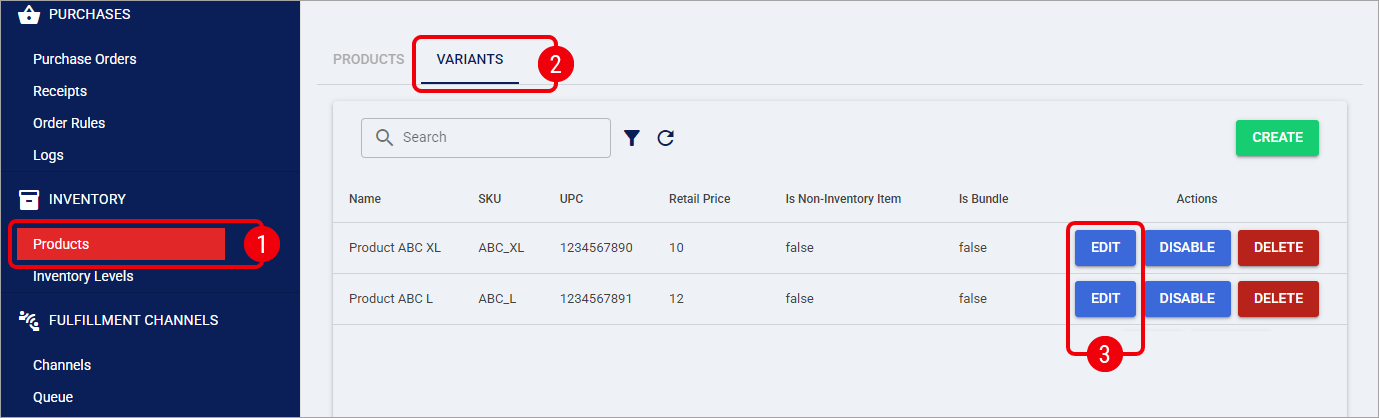
Modify the fields accordingly.
Refer to the Product Variant Interface section above for details about the fields you can modify.
Press Save to apply the changes.
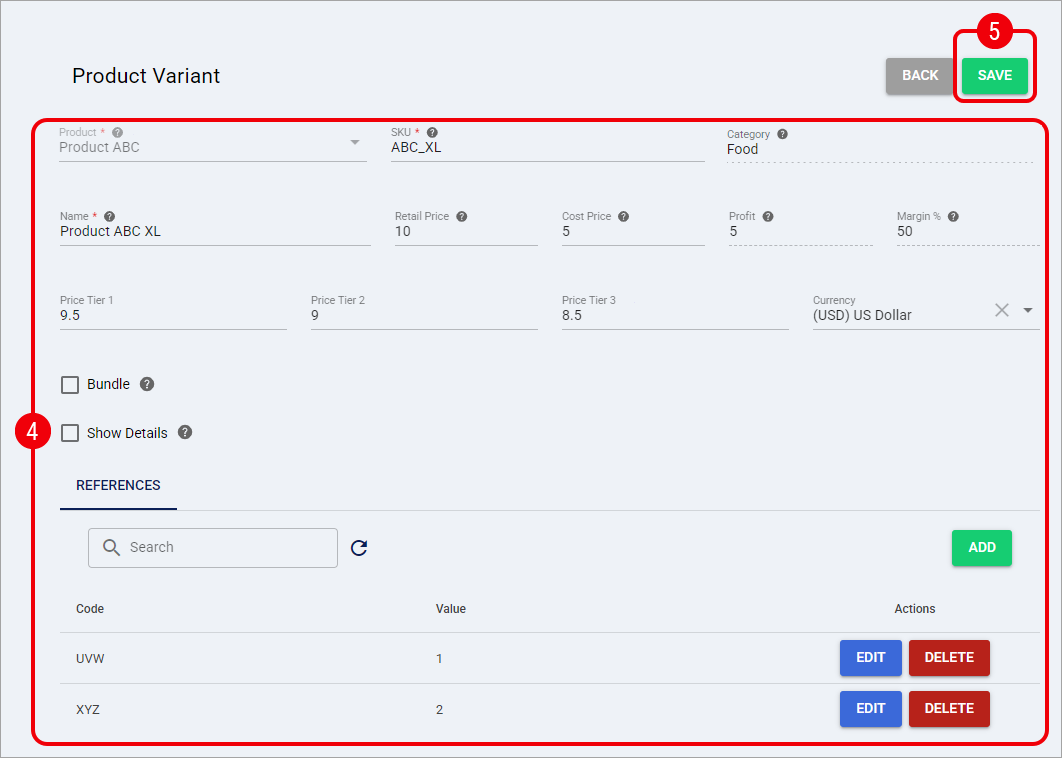
The Product Variant details are now successfully updated and saved in the system.
You can now return to the Variants tab to review the updated Product Variant or edit another one.